






Your CRM Was Never Built for Finance. Here's How to Make It Work for Them Anyway.
Every B2B company runs on a CRM. It's where deals get worked, opportunities get tracked, and revenue technically "happens," at least on paper. Salesforce and HubSpot have become the default system of record for go-to-market teams, and for good reason: they're built to help sales sell.
The problem is what happens next. The deal closes. Someone marks it "Closed Won." And now finance is supposed to turn that CRM record into an accurate invoice, a compliant revenue recognition schedule, and a clean line in the books, using a system that was never designed to hold any of that.
The CRM-finance gap is a structural problem
Ask most finance teams how a deal actually gets billed today, and the answer most likely involves a fair amount of manual work: someone opens the opportunity, tracks down the attached contract PDF, re-keys pricing and terms into the billing system, and hopes nothing changed between the quote and the signature. Multiply that by every renewal, amendment, and multi-year deal, and you get exactly the kind of delay, error, and reconciliation risk that keeps close cycles long and audits painful.
This isn't a people problem. It's a systems problem. CRMs are optimized for pipeline visibility, not for holding structured, auditable commercial terms. And every company's CRM looks different: custom fields, custom objects, unique pipeline stages, different rules for what counts as "done." A rigid, one-size-fits-all sync between CRM and billing breaks the moment a business doesn't fit the template, which is most of them.
Your CRM, your rules
The fix isn't to ask sales to do finance's job inside the CRM, or to force every business into conforming their data to follow one rigid structure. Some finance teams anchor to the signed contract, while others rely on data captured on the opportunity or deal record. AI-native billing and revenue automation platform, Tabs, sits downstream of the CRM and supports both: you configure exactly what data flows into Tabs, whether that's the contract, CRM data, or a combination of the two, which then applies that context to billing, revenue recognition, and reporting automatically.
That flexibility matters. And when a deal changes mid-term, whether through a new amendment or an updated CRM record, Tabs pulls in the most current version as the new source of truth, so billing always reflects what's actually true today.
How Tabs integrates with Salesforce and HubSpot
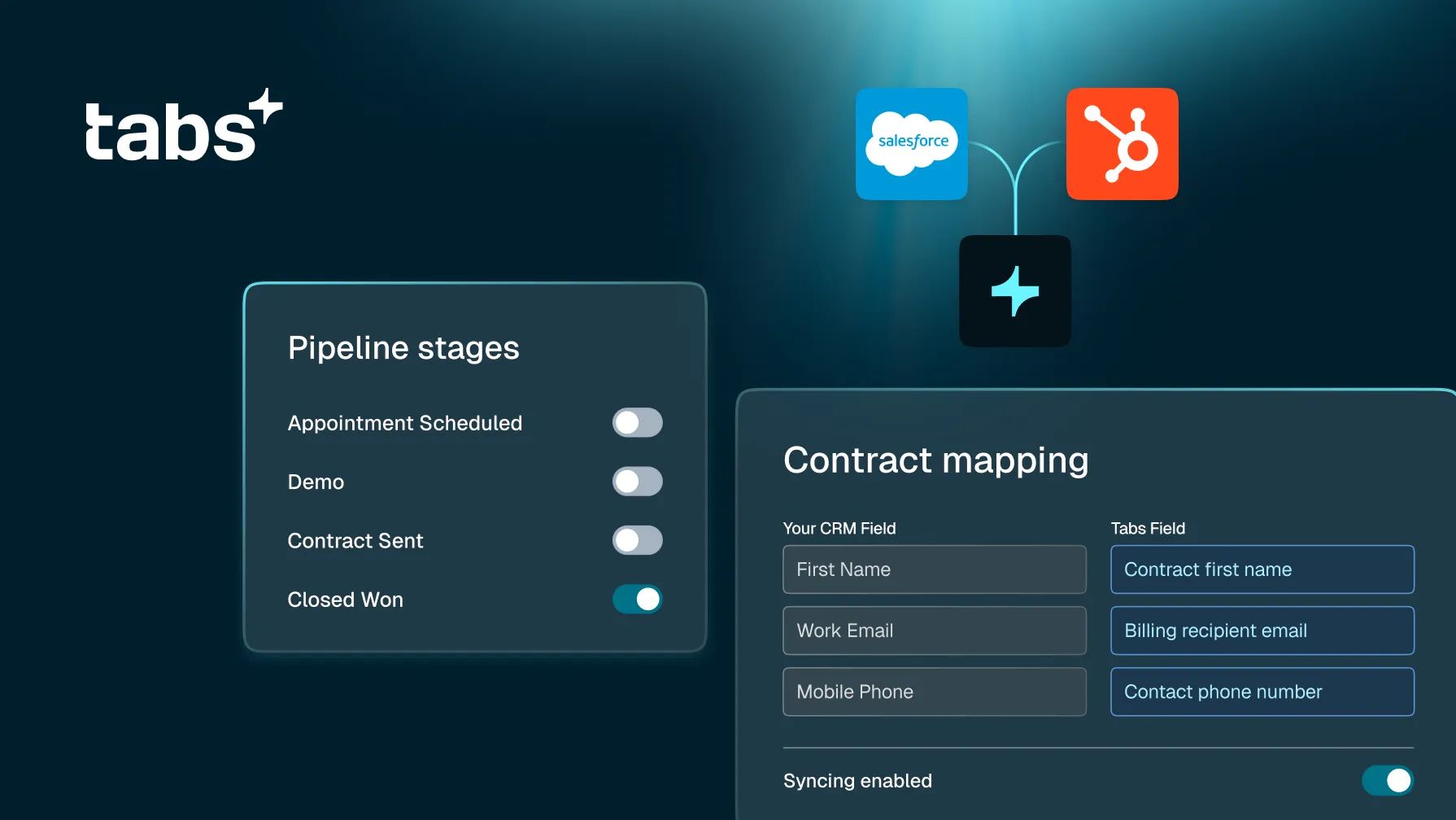
Tabs connects natively with both Salesforce and HubSpot, the two CRM platforms most B2B finance teams already have in place. In both cases, the model is the same: when a deal is marked Closed Won, the customer, contract, and contact data, along with the signed contract itself, flow into Tabs automatically, and invoicing and revenue workflows run from there.
The real significance here isn't just that the integration exists. It's how much control finance teams get over it, and how far that control extends across every part of the CRM relationship:
- Configurable object and field mapping. Finance teams can map any standard or custom Salesforce or HubSpot field, including custom objects, to the corresponding Tabs record, and define exactly how those fields transform on the way in. No more hardcoded integrations that break the moment a CRM setup doesn't match the default template.
- Pipeline-aware syncing. Teams choose which pipeline stages actually trigger a sync, so only real, qualified deals create contracts in Tabs, not every opportunity that happens to move through the pipeline.
- Control exactly what gets synced. Set rules that determine which CRM records flow into Tabs based on your business logic, so the data that lands in Tabs reflects the nuance of how the business actually sells, rather than a generic mapping.
- Contract pulled automatically. Whether a contract lives as a direct attachment, a note, or a signed quote, Tabs identifies and pulls the right document for processing, no manual export or PDF scavenger hunt.
- Multi-currency and account hierarchy support. For Salesforce specifically, Tabs bills correctly across multi-currency orgs and mirrors account hierarchies, so parent/child billing rolls up the way the business is actually structured.
- Instance routing for multi-entity businesses. Companies running multiple Tabs instances, by region, business unit, or legal entity, can route customers and contracts to the correct instance automatically, based on CRM field values.
- Data flows both ways. Invoices, line items, and payment status push back into Salesforce and HubSpot automatically, so account teams have visibility into what's been billed without leaving the CRM.
- Contacts and addresses stay connected. Map CRM contact fields into Tabs so the right people stay attached to every account, and sync billing and shipping addresses directly from the CRM, so revenue workflows run on accurate, up-to-date account details.
The best part? None of this requires a support ticket or an engineering request. It's self-serve, and can be revisited and adjusted any time your CRM setup or sales process changes.
Why this matters for finance teams, beyond the mechanics
The real value isn't just the field mapping itself. It's what accurate, structured, and grounded data unlocks:
- Speed to cash. Invoices generate the moment a deal is eligible, not after someone gets around to entering it.
- Fewer disputes. Invoices that trace directly back to the terms configured as the source of truth, whether that's the contract, structured CRM data, or both, are more accurate.
- Audit-ready revenue recognition. A clear, traceable line from CRM event to contract term to recognized revenue makes ASC 606 compliance and audit prep dramatically faster.
- Alignment across teams. Sales sees what finance sees, and vice versa. No more "swivel chair" reconciliation between systems that were never talking to each other.
CRM integration used to mean "move a few fields from one system to another." For finance teams running real revenue operations at scale, that's not integration, it's a liability waiting to surface at audit time. The bar now is a CRM connection that adapts to how the business actually operates, keeps sales and finance looking at the same numbers, and turns the moment a deal closes into the moment accurate billing begins.